Baofeng GMRS UV-9G Programming Quick Start
Channel Selection
The UV-9G is a GMRS radio with NOAA weather stations pre-programmed. GMRS overlaps the same channels that “walmart” radios use but allows for more power output and thus more range. You are supposed to have a FCC license to operate at the higher power levels but is is difficult to find a single instance of this rule being enforced for simplex walkie to walkie transmissions (tx). GMRS also allows for the use of connecting to repeaters. Repeaters are like cell towers for radio, they take your transmit (tx) and “repeat” that so your communications can be heard from further away. Repeaters operate on two frequencies, the first is the transmit (tx) and the second is the receive (rx). You send your tx which opens the squelch of the repeater and others listening will receive that on the rx frequency. Generally repeaters are setup in a way that has a broad coverage over a large geographic area and operate using higher end antennas and radios. You can also DIY a repeater and throw it up in a tree when camping to cover a large area around where you are staying. These are often maintained and owned by individuals or HAM radio clubs. Websites like repeaterbook.com list available repeaters across the US. If you are not licensed and do not know proper radio etiquette do not key up a repeater.
Picking a Channel
Open the GMRS/FRS Channel Guide. You’ll notice channel 1-7 have a ouput of 5W, 8-14 are 0.5W, and 15-22 are 50W. The W is for watts, or more generally power output.
1-7 will align with “walmart” walkies, so if you want to include someone that does not have a higher end walkie, stick in this range. The UV-9G has a maximum listed output of 5W. “Walmart” walkies will top out at 2W. Expect to be able to transmit much further using the UV-9G than any cheap store bought walkie. However the cheaper walmart walkie will still be able to hear you, you just might not hear them.
Avoid using 8-14. 0.5 W is not enough to cut through trees. This is more useful if you are handing out walkies for use on a construction site or warehouse.
15-22 are where most repeaters live. Given these frequencies are allowed to go up to 50W, repeater operators prefer these channels to utilise much higher power equipment. In general these channels will be quieter for use on simplex (walkie to walkie communication) because “walmart” radios cannot talk here. It is unlikely to interfere with any repeater on simplex. Without keying in a repeaters offset, or privacy tone, you will not be opening the repeaters squelch. These channels are great a great option if you are anywhere near a camp site where a lot of people are likely to be on “walmart” radios and you want to avoid the interference.
Basic Operation
Dual Channel Mode (TDR)
The Baofeng UV-9G is a dual channel radio. This means you can have two frequencies open at the same time. You can listen to two frequencies at the same time, but mostly you want Channel A to be set to the GMRS channel you want to talk on, and Channel B to be the closest NOAA weather station. Because NOAA stations transmit constant non-stop weather reports this can get very annoying to listen to both frequencies at the same time, however if you did want to enable that it is menu option 7, TDR.
Menu operation:
1) Press the [MENU] button
2) Press the ▲▼ buttons to scroll to the menu option
3) The top line is the name of the menu option, the bottom line is what that setting is set to
4) Press menu again and use the ▲▼ buttons to change the setting
5) Press [MENU] and the voice prompt will say “confirm”
6) Press [EXIT] button to exit menu or wait for the menu to close
7) Avoid changing settings until you fully understand them in the user manual
Radio operation
1) To switch between Channel A and Channel B press [EXIT] and you will see a small symbol that looks like ▲▼ (on the screen, not talking about the up and down buttons here) next to the current channel.
2) Once you have picked A or B press the ▲▼ buttons to go through the pre-programmed channels. You can also type the number on the keypad to skip to that exact channel in a 3 digit format. For example if you want to skip to GMRS1 you can just type in 001 on the keypad.
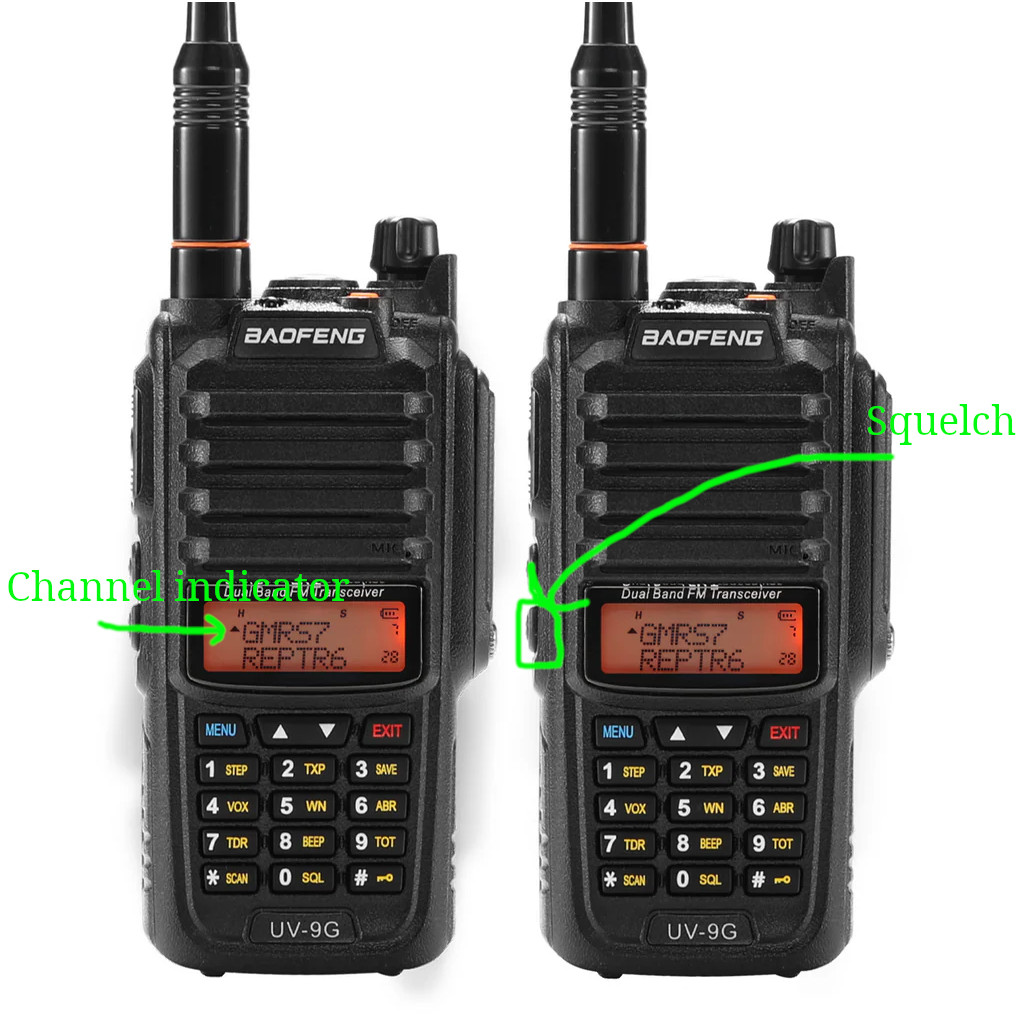
3) If you cannot hear the other person they might be just out of reach. You can attempt to hear the other person by “opening the squelch.” The shortcut to this is to press and hold the bottom button on the side of the radio. You will know it is working when you hear the static, and hopefully the faint communication you are hoping to hear.
4) To talk press and hold the [PTT] giant button on the side
In the picture below, the radio is set to talk on Channel A:
▲ Channel A, GMRS7, 007
Channel B, REPTR6, 028
Communicating Effectively
GMRS handheld radios operates in the FM (frequency modulation) range in the Ultra High Frequency (UHF) band in simplex mode. This means you cannot listen to more than one person talk at a time. Only AM (amplitude modulation), digital radios, and repeaters setup for full duplex have this ability to have more than one person speak at the same time. This is actually why aviation still use AM radios, because multiple pilots need to able to communicate to each other and speak to air traffic control simultaneously
Wait for the other person to be done talking, then hit [PTT] to respond. There is often a short delay before the radio picks up what you are saying so hold down [PTT] for a short pause before speaking helps.
If you notice that you are struggling to hear the other person and want to permanently lower the squelch it is menu option 0. By default the radio is set to 5. You can try lowering this to 2 or 3 and see if you can more reliably hear the other person.
How to Hold a Radio
1) Always keep the antenna pointed vertical at all times for best range
2) Hold 3 inches from your face
3) Never hold by the antenna
Squelch and Range
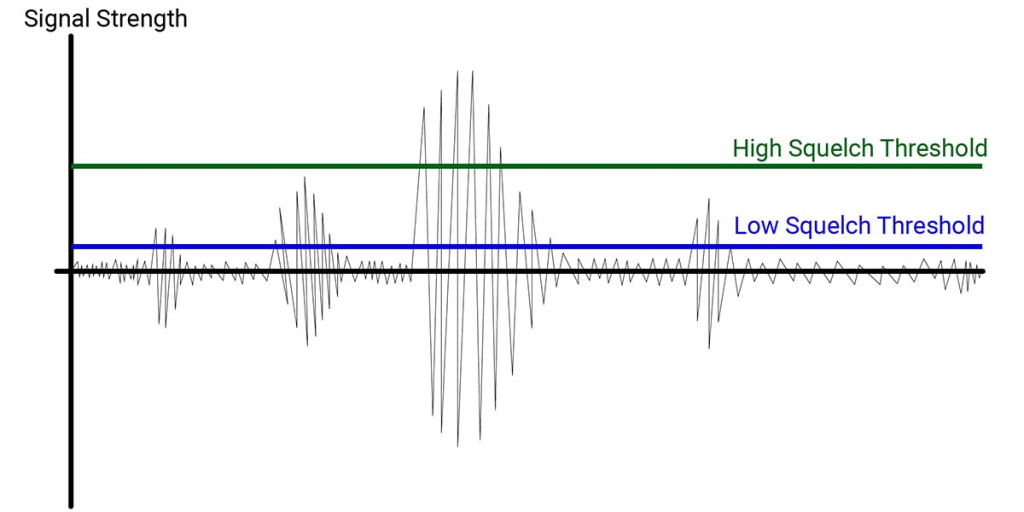
Squelch in radio means the amount of “noise” the radio needs to hear before it starts playing over the speaker. There is always constant white noise playing on every radio frequency imaginable. Breaking the squelch is what allows you to hear the other person. This is an important concept to understand when attempting to hear someone at the edge of transmission range. By holding the squelch button on the radio you are effectively lowering the squelch setting to 0, this is also known as “monitoring mode.”
When discussing radio range the important factors are:
1) Elevation
2) Terrain
3) Power
4) Antenna length
Elevation
The person with the highest elevation will be able to transmit further and hear the most. This is why many repeaters are setup high on a hill or mountain, or DIYed up to the top of a tree.
Terrain
Trees, rocks, buildings and other obstructions absorb some of the radio frequencies. GMRS operates in the UHF band which punches through objects more effectively but has an overall lower distance travelled than VHF which travels very far distances and bounces over terrain more easily.
If you cannot hear the other person or they cannot hear you, seek higher ground and a better line of sight. Best case scenario, you are on a mountain top, the other person is on another mountain top. This condition is perfect line of sight with just air between you. You can expect 30 miles of range at 5W. This shrinks down to a 1.5 to 2 miles of range when adding trees and different elevations.
Antennas
A commonly overlooked aspect of signal range is the antenna. A properly tuned antenna is more useful to extend range than an increase in output watts.
Antennas are the radiating element of the radio. All transmissions are sent and received by the antenna. Since they are actually “radiating” having a basic understanding of electrical systems and physics go a long way to understanding them.
More long does not equal more range. However matching antenna length to a harmonic length of the radio frequency does equal much greater range. The two antennas that came in this radio are properly matched and you can expect 30% to 60% better range with the longer antenna where the shorter antenna is the quarter wave and the longer antenna is a 5/8 wavelength.
You can see clearly the direction of travel represented in the red line of the antennas in the picture below. Technically the red line represents the amount of current is outputting at what part of the antenna however this correlates with the direction of travel the rf is sent. Notice how the 5/8 pushes the current mostly forwards and slightly down where as the 1/4 wave is shooting mostly up to the sky?
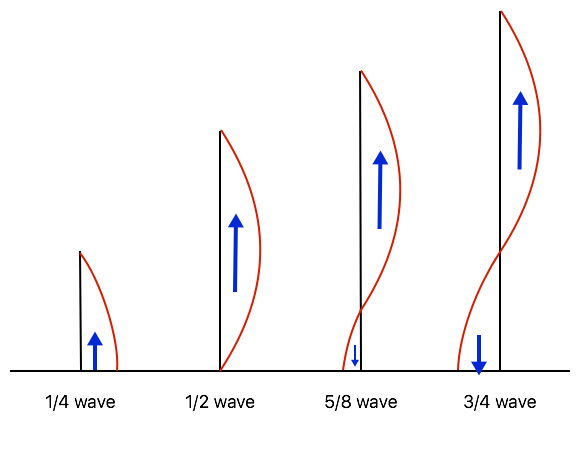
Current distribution on vertical antennas of different lengths
Why 5/8?
5/8 antennas are considered the best for handhelds because at this length most of the signal is driven strongly across the ground plane (horizon) which drives more of the signal towards the person you are talking to.
A ⅝-wave antenna has:
- Lower radiation angle than a ¼-wave
- Slight gain over a quarter-wave
- Better forward energy along the horizon
Typical real gains:
- ¼-wave: baseline (0 dB reference)
- ⅝-wave: +2 to +3 dB in ideal conditions
On an HT (handheld), that usually translates to:
Noticeably stronger receive in fringe areas
~30–60% more usable range
Better performance across rolling terrain
Antenna Grounding
This is referring to the electrical grounding as opposed to the ground plane from earlier that was referencing the horizon line. Grounding in radios means a counter-poise not an earth ground. A counter-poise is something for the rf (radio frequencies) to flow against. Most handhelds including the UV-9G expect an electrical resistance of 50 ohms from the antenna. A mismatch in impedance (ohms) can harm the efficiency of the radio since the electricity requires somewhere to flow which would be back into the radio reducing the amount of power the radio is outputting.
All antennas must have:
1) A radiating element (the whip)
2) The return path
On 1/4 wavelength antennas the current is concentrated at the base of the antenna. This requires a strong counter-poise through your hand/body holding the radio properly to perform well. It also requires the antenna to be held very upright to perform. 1/4 wavelength antennas are naturally about 50 ohms of resistance and therefore do not require a very complicated counter-poise to exist in the antenna itself.
On 5/8 wavelength a solid counterpoise through your hand/body is less crucial to performance and range will be less effected by tilting the radio. However it does require a much better counter-poise to exist inside the antenna. A cheap 5/8 will lose to a cheap 1/4 when held properly but a well matched 50 ohm 5/8 is best for getting the maximum range out of a handheld radio.
Calculating Antenna Length
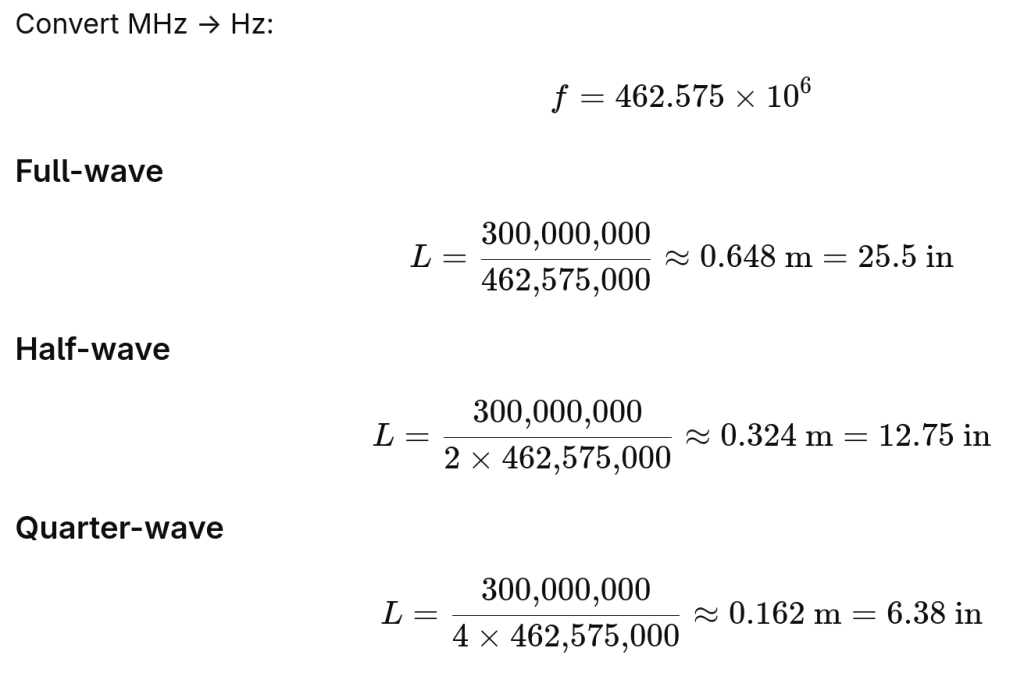
Antennas radiate best on lengths that are harmonics of the frequency that they operate on.
To calculate proper antenna length use the following equation where 300,000,000 is a constant representing the speed of light in meters per second and 462.575MHz is GMRS frequency of channel 16:
NOAA Weather Stations
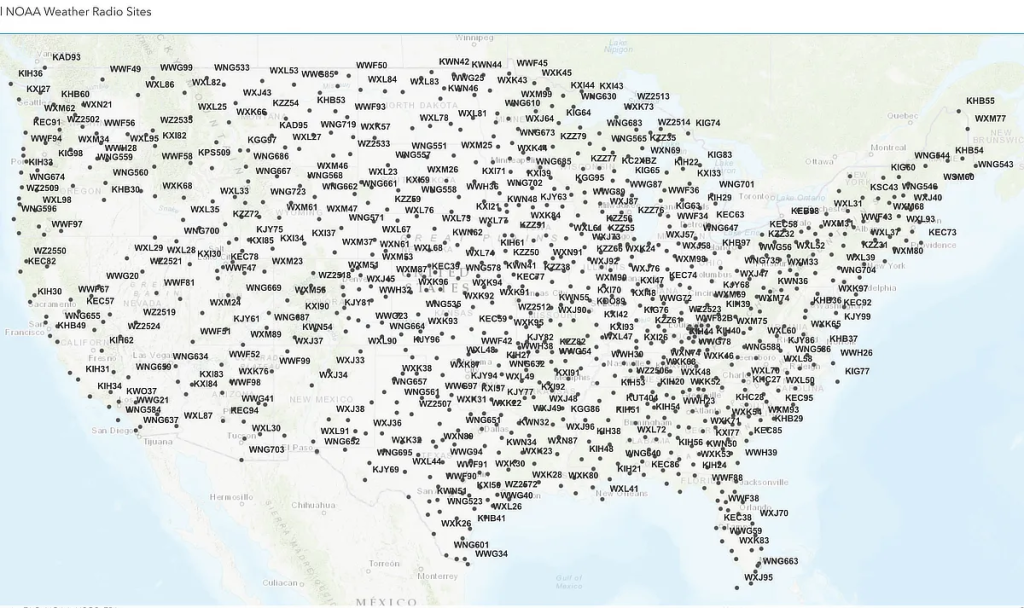
NOAA weather stations are operated by the National Weather Service. They transmit a 24/7 broadcast of weather in the area that the station covers. In order to hear NOAA you need to tune the UV-9G to the nearest station. The chart below lists how NOAA channels are stored in the UV-9G.
To find a NOAA station start at channel 117 and step up with the ▲ button until you hear something. There should only be one channel that you can hear easily.
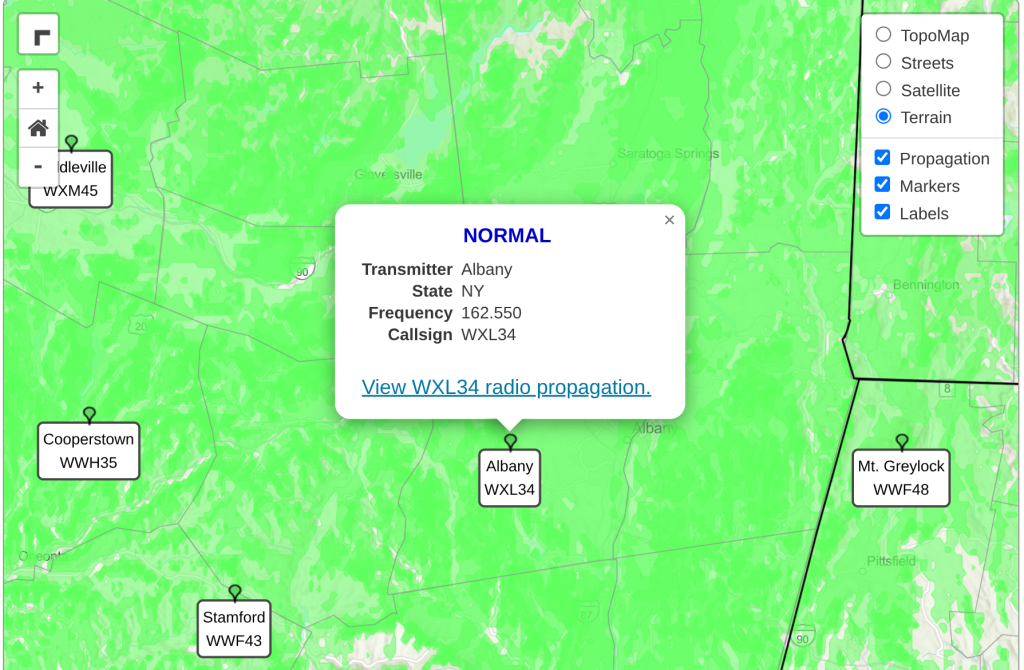
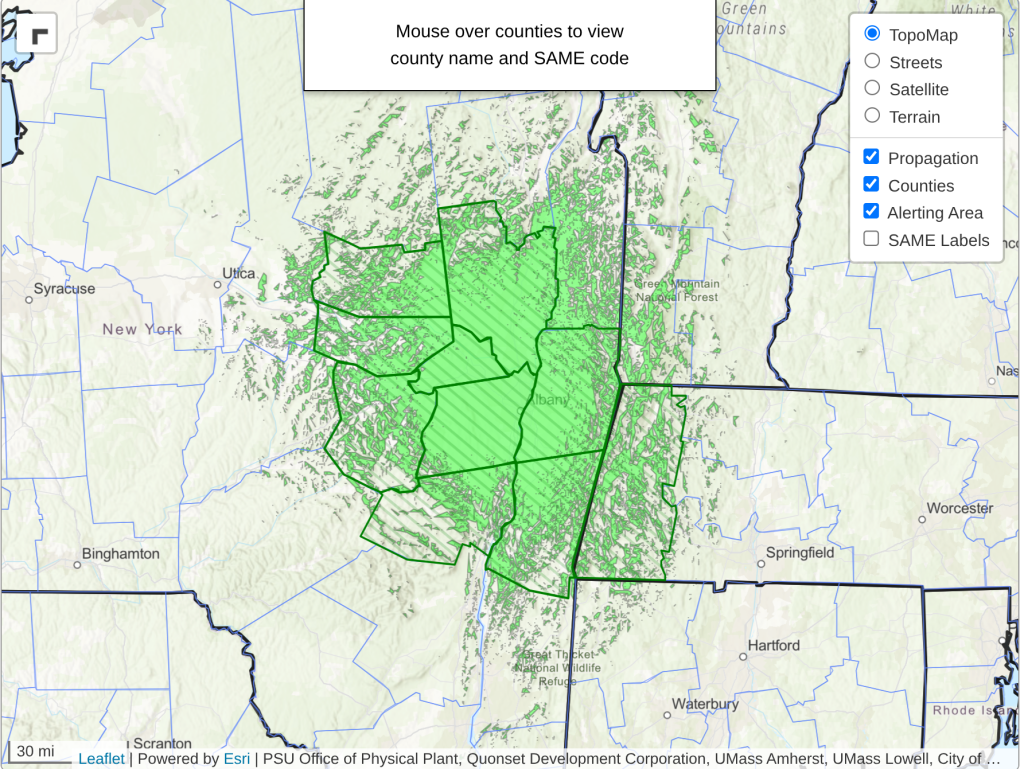
If you do want to ensure you know exactly which station will be in use before heading out, check on the NOAA station guide website linked in the button at the top of this page, select a state, and click on one of the stations to reveal its details. In the screenshot below you can see that transmitter Albany has a frequency of 162.550. If you click the “View WXL34 radio propagation” it will display a map showing exactly where you can hear that station. If you keep scrolling down this page to the table you can see that 162.550 correlates to UV-9G channel 123.
Albany transmitter details
Albany transmitter propagation map
UV-9G NOAA pre-programmed channels
| UV-9G Channel | Frequency | Notes |
|---|
| 117 | 162.400 | WX1 |
| 118 | 162.425 | WX2 |
| 119 | 162.450 | WX3 |
| 120 | 162.475 | WX4 |
| 121 | 162.500 | WX5 |
| 122 | 162.525 | WX6 |
| 123 | 162.550 | WX7 |
| 124 | 162.400 | Duplicate |
| 125 | 162.425 | Duplicate |
| 126 | 162.450 | Duplicate |
| 127 | 162.475 | Duplicate |